
If This, Then Smarter: Make a Sprite that Learns!
Writer/Editor: Abhiram Kaakarla
👋 Welcome back, Explorers!
At Algorithm Playground, we turn BIG computer science ideas into fun-sized learning adventures for little minds. Today’s adventure? Giving your sprite some “brains”—we’re building a character that learns how you move and reacts differently every time you play.
💡 What’s an AI-Powered Character (in Scratch)?
In real-world games, computer-controlled enemies (or NPCs) often use adaptive behavior.
They track how players move and respond accordingly—getting smarter over time.
In Scratch, we can simulate this with logic, variables, and a little bit of pattern memory.
🚀 Today’s Mission: Create an Adaptive Enemy
We’ll build a sprite that watches how you move—left, right, fast, slow—and then changes strategy based on your habits!
Let’s call it: SmartSprite 👾
🧩 Step-by-Step Guide
🟦 Step 1: Set Up Sprites
Go to scratch.mit.edu, hit Create, and add:
Player Sprite (ex: ninja or rocket)
SmartSprite (Enemy) (ex: robot or alien)
(Optional): A Goal Sprite to make it a challenge!
🟦 Step 2: Track the Player’s Movement
Add a variable: playerMovesRight
This will count how many times the player goes right.
Player Sprite Code:
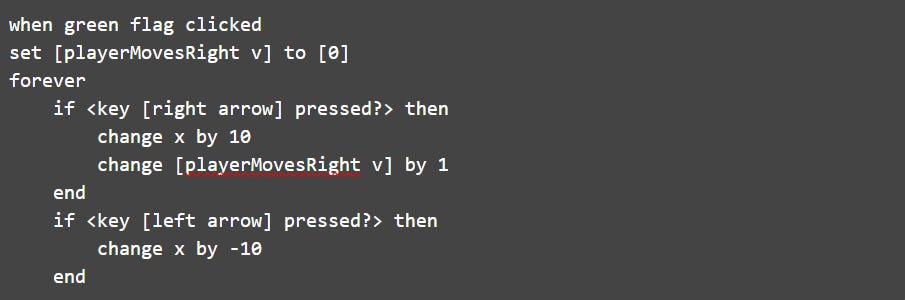
🧠 What’s happening?
You're logging behavior: how often the player moves right.
This is basic player tracking—a foundation of adaptive AI.
🟦 Step 3: Make the Enemy React
SmartSprite Code:
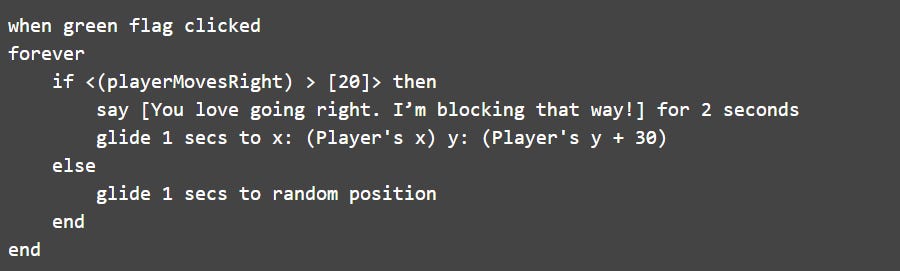
👀 Now the enemy watches your habits.
If you’re always moving right? It starts anticipating you.
That’s adaptive logic!
🟦 Step 4: Make It Learn More
Try tracking other patterns:
playerMovesLeftplayerSpeedreactionLevel
Use conditionals to create personalities for your sprite:
Aggressive: Chases fast if you move a lot
Lazy: Ignores you until you're close
Smart: Waits in places you often go
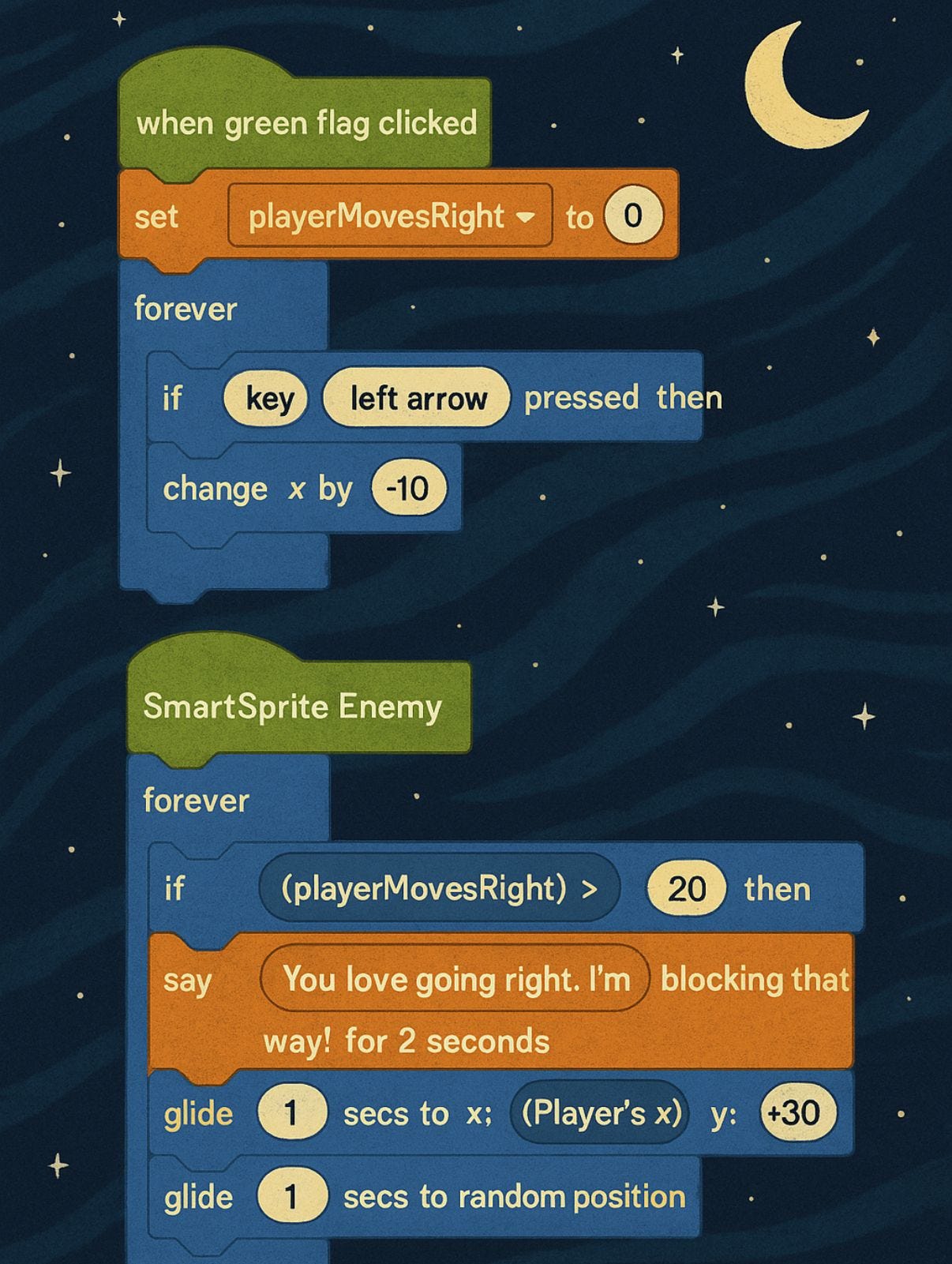
🖼️ Visual Walkthrough
Here’s what your logic blocks might look like:
🎮 Games With Smart Behavior on Scratch
Explore these projects for ideas:
👉 Enemy That Follows Player – Scratch
👉 Simple AI Reaction Game – Scratch
💬 Computer Science Quote of the Day
🖋️ “The best programs are the ones written when the programmer is supposed to be working on something else.”
— Melinda Varian
🧠 Why It Matters
Even in beginner-friendly tools like Scratch, you can teach computers to adapt, remember, and respond.
That’s the core of AI!
By combining variables, conditionals, and input tracking, you're moving from static games to interactive intelligence.
🔥 What’s Next?
Next time, we’ll learn about basic AI—that means teaching computers to act smart!
We’ll talk about:
🤖 What AI really is
🧠 How computers can learn from what you do
🕹️ How to make a sprite that gets better each time you play
It’s like giving your game a brain! 💡
Can a computer really think? Let’s find out together!
Until then, keep experimenting, learning, and imagining what your sprite could do next.
🎉 See you in the Playground!